Your Running Total Is Wrong on the First Row: Window Functions, RANGE, and the Default Nobody Reads

GROUP BY collapses rows; a window function keeps every row while still computing the group total. Measured: on the same 200,000-row table, GROUP BY returns 200 rows and the window returns 200,000 rows. It is also faster than the old approach — replacing a self-join with a window took the query from 79.2 ms down to 22.7 ms. But there is one default that quietly corrupts numbers and almost nobody reads it: OVER (ORDER BY ...) uses a RANGE frame, so every peer row receives the same running total. If you want a row-by-row cumulative sum, you must spell out ROWS.
Window functions turn long-winded reporting queries into a few readable lines. They also carry exactly one trap subtle enough to pass code review: a running total that looks plausible in the middle and is wrong wherever values tie.
This post goes deeper into Recursive Queries and Window Functions from the 30-day SQL series. Every number here was measured on PostgreSQL 16.11.
TL;DR
GROUP BYcollapses rows; a window function keeps them and adds the aggregate alongside.- Replacing a self-join with a window: 79.2 ms → 22.7 ms over 200,000 rows.
OVER (ORDER BY x)defaults to aRANGEframe, which lumps together every row sharing the samex.- For a row-by-row running total, spell out
ROWS BETWEEN UNBOUNDED PRECEDING AND CURRENT ROW. rank,dense_rankandrow_numbergive three different answers when values tie.
The core difference: collapse or keep
A sales table of 200,000 rows covering 200 employees.
GROUP BY collapses:
SELECT nhan_vien, sum(doanh_so) FROM ds GROUP BY nhan_vien;
-- GROUP BY returns 200 rows
The window function keeps everything:
SELECT nhan_vien, doanh_so, sum(doanh_so) OVER (PARTITION BY nhan_vien) FROM ds;
-- WINDOW returns 200000 rows
That is the whole difference in nature. GROUP BY answers "what is the total per group?" A window function answers "what is this row, and what is its group's total?" — keeping the detail so you can compute further, such as each row's share of its group:
SELECT nhan_vien, thang, doanh_so,
       round(100.0 * doanh_so / sum(doanh_so) OVER (PARTITION BY nhan_vien), 2) AS ty_le_phan_tram
FROM ds;
Writing that with plain GROUP BY means aggregating and then joining back to the original table.
A window beats a self-join
Before window functions were widespread, the move was to aggregate into a derived table and join back:
-- The old way
SELECT count(*) FROM ds d
JOIN (SELECT nhan_vien, sum(doanh_so) s FROM ds GROUP BY nhan_vien) g
  ON g.nhan_vien = d.nhan_vien;
-- Time: 79.196 ms
-- The new way
SELECT count(*) FROM (
  SELECT sum(doanh_so) OVER (PARTITION BY nhan_vien) FROM ds
) q;
-- Time: 22.659 ms
About 3.5× faster, and considerably shorter. The reason: the self-join version scans the table twice and then matches the results, while the window function scans once, sorts by partition, and computes as it walks the data.
The trap: RANGE is the default, not ROWS
This is the most valuable part of the post, and the part where I tripped over my own test setup.
Three rows, two of them on the same date:
| ngay | tien |
|---|---|
| 2026-01-01 | 100 |
| 2026-01-01 | 200 |
| 2026-01-02 | 300 |
A running total written the way everybody writes it:
SELECT ngay, tien,
       sum(tien) OVER (ORDER BY ngay) AS mac_dinh,
       sum(tien) OVER (ORDER BY ngay ROWS BETWEEN UNBOUNDED PRECEDING AND CURRENT ROW) AS ro_rang
FROM b ORDER BY ngay, tien;
The actual result:
| ngay | tien | default (RANGE) | explicit ROWS |
|---|---|---|---|
| 2026-01-01 | 100 | 300 | 100 |
| 2026-01-01 | 200 | 300 | 300 |
| 2026-01-02 | 300 | 600 | 600 |
Look at the first row: the running total for a row holding tien = 100 reads 300.
The reason is the window frame. When you write OVER (ORDER BY ngay) without declaring a frame, SQL silently means:
RANGE BETWEEN UNBOUNDED PRECEDING AND CURRENT ROW
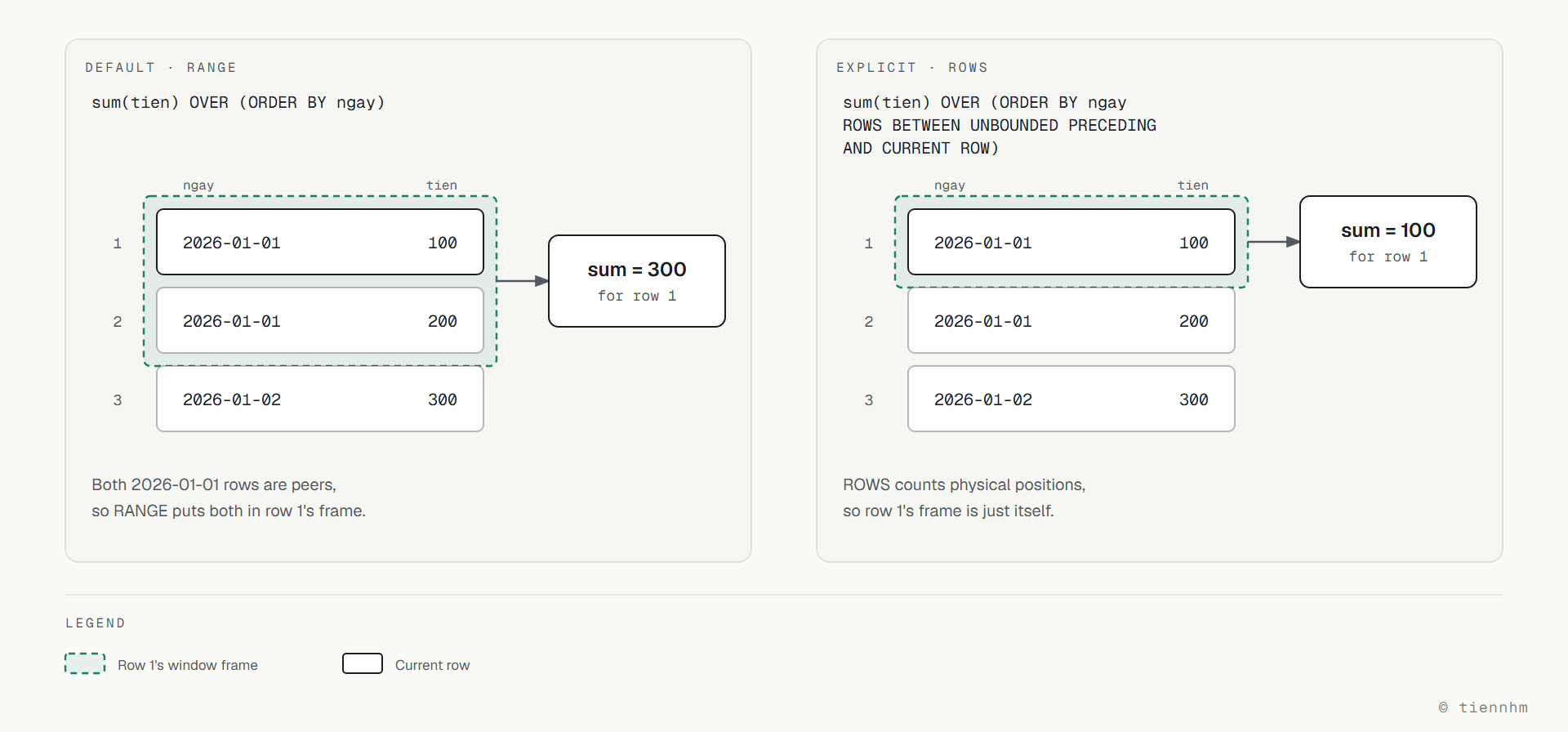
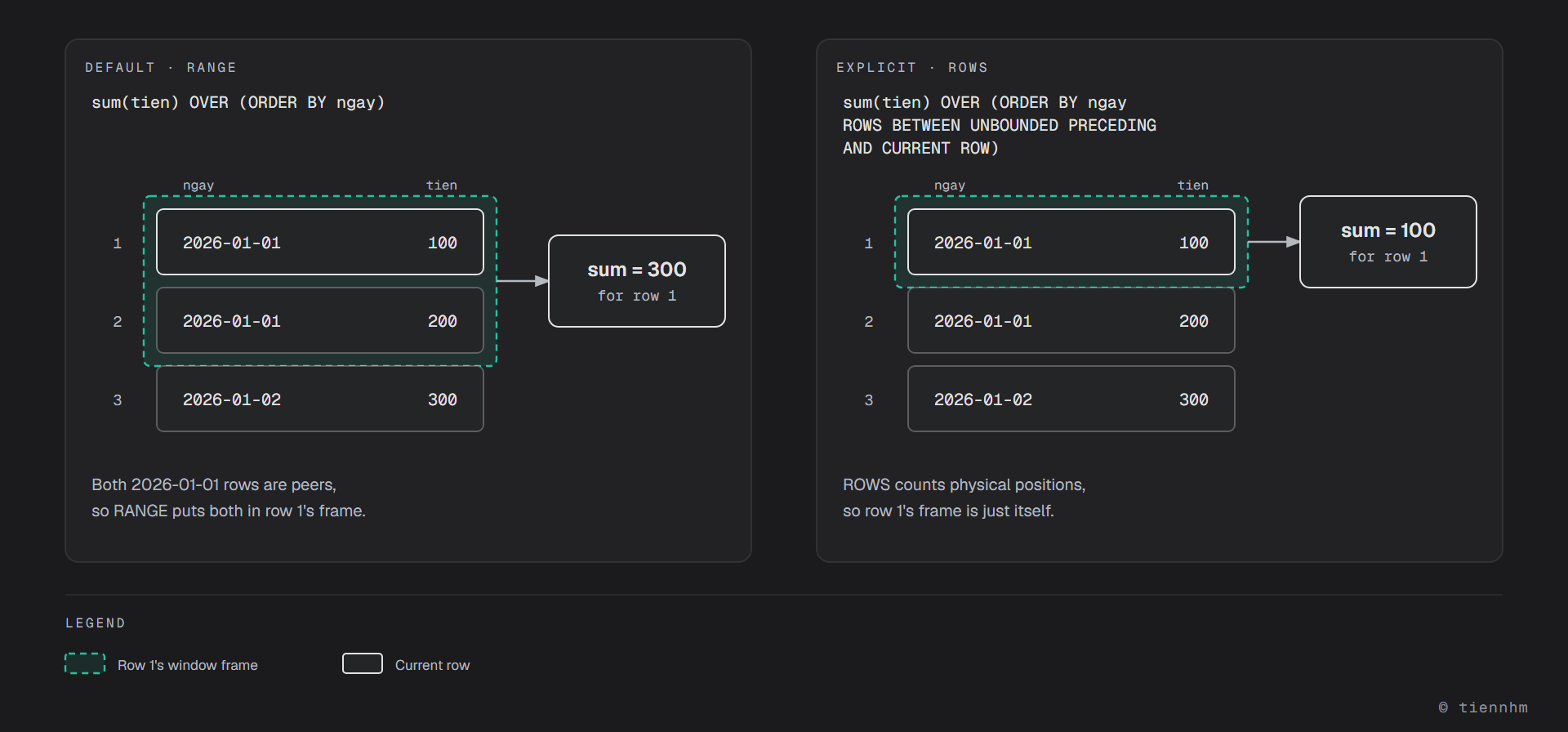
And RANGE decides what "the current row" covers by the value of the ORDER BY column, not by row position. The two rows dated 2026-01-01 are peers, so both count as "everything through 1 January" — and both receive 300.
ROWS counts by physical position instead: the first row contains only itself, so it reads 100.
The first row's window frame in each case:
Which to pick
| What you want | Use |
|---|---|
| A row-by-row cumulative sum | ROWS BETWEEN UNBOUNDED PRECEDING AND CURRENT ROW |
| Total through each point in time (peers lumped together) | RANGE (the default) |
| A 7-row moving average | ROWS BETWEEN 6 PRECEDING AND CURRENT ROW |
| Total across the whole partition | drop the ORDER BY |
One last detail worth remembering on its own: adding ORDER BY inside OVER() silently converts a whole-partition total into a running total. Plenty of people add ORDER BY to "tidy up the output" and then cannot work out why the total column changed its numbers.
sum(x) OVER (PARTITION BY g)              -- whole-group total, same on every row
sum(x) OVER (PARTITION BY g ORDER BY t)   -- running total, a different number per row
A practical rule: if your statement has an ORDER BY inside OVER(), declare the frame explicitly. It costs a few more words, and the next reader does not have to remember what the default was.
Three ranking functions, three different answers
This is where the wrong one gets picked. Same data, with a tie in it:
SELECT tien,
       rank()       OVER (ORDER BY tien DESC) AS rank,
       dense_rank() OVER (ORDER BY tien DESC) AS dense_rank,
       row_number() OVER (ORDER BY tien DESC) AS row_number
FROM (VALUES (300),(200),(200),(100)) v(tien);
| tien | rank | dense_rank | row_number |
|---|---|---|---|
| 300 | 1 | 1 | 1 |
| 200 | 2 | 2 | 2 |
| 200 | 2 | 2 | 3 |
| 100 | 4 | 3 | 4 |
Three functions, three behaviours:
rank— ties share a number, then the sequence skips. Two people in 2nd place means the next is 4th. This is how sports rankings work.dense_rank— ties share a number, but nothing is skipped. The next is 3rd. Use it when you need "how many distinct value levels are there".row_number— no ties at all, every row gets its own number. Use it for pagination, or to pick exactly one representative row per group.
Choosing rank where you meant dense_rank is a silent bug: the leaderboard still looks reasonable, it is just that positions skip, or fail to skip, against what the business expects.
row_number also has one very common use — pulling the latest record per group:
SELECT * FROM (
  SELECT *, row_number() OVER (PARTITION BY khach_id ORDER BY tao_luc DESC) AS rn
  FROM don_hang
) q WHERE rn = 1;
Writing that with plain GROUP BY means finding MAX(tao_luc) and joining back — and it is still wrong if two orders share a timestamp.
Keep reading
This post expands on one lesson from the 30-day SQL series:
| Lesson in the series | How it connects |
|---|---|
| Recursive Queries and Window Functions | OVER and PARTITION BY syntax, plus recursive CTEs |
| GROUP BY and HAVING | The traditional way to aggregate |
| Aggregate functions | SUM, AVG, COUNT — shared by both approaches |
| Subqueries | The derived table you need in order to filter on a window result |
| Query performance | Reading the plan to compare a window against a self-join |
A note on processing order: window functions run after WHERE and GROUP BY, so you cannot filter on their output directly in WHERE. You have to wrap the query in a derived table and filter outside it, as in the rn = 1 example above. I covered that clause ordering in more depth in the post on LEFT JOIN becoming INNER JOIN.
Frequently asked questions
How does a window function differ from GROUP BY?
GROUP BY collapses many rows into one row per group, while a window function keeps every row and adds the group's aggregate alongside it. Measured on the same 200,000-row table covering 200 employees, GROUP BY returned 200 rows and the window returned 200,000. Because the detail survives, a window lets you compute things like each row's share of its group without joining back to the original table.
Why is a running total written with OVER (ORDER BY ...) wrong on the first row?
Because the default frame when ORDER BY is present is RANGE BETWEEN UNBOUNDED PRECEDING AND CURRENT ROW, and RANGE decides what the current row covers by the value of the ORDER BY column rather than by row position. Every row sharing that sort value is a peer and receives the same running total. For a row-by-row cumulative sum you must spell out ROWS BETWEEN UNBOUNDED PRECEDING AND CURRENT ROW.
What is the difference between RANGE and ROWS in a window frame?
ROWS counts by physical row position, while RANGE counts by the value in the ORDER BY column and groups all peer rows together. On a table with two rows dated 1 January holding 100 and 200, the RANGE running total reads 300 for both rows, whereas with ROWS the first reads 100 and the second 300. The practical rule is that whenever there is an ORDER BY inside OVER, declare the frame explicitly.
How do rank, dense_rank and row_number differ?
Over the values 300, 200, 200, 100 rank gives 1, 2, 2, 4 because ties share a number and then the sequence skips; dense_rank gives 1, 2, 2, 3 because ties share a number but nothing is skipped; and row_number gives 1, 2, 3, 4 because every row gets a unique number. Use rank for sports-style standings, dense_rank when you need to count distinct value levels, and row_number for pagination or to pick one representative row per group.
Is a window function faster than a self-join?
Yes, in the common case of attaching a group aggregate to every row. Measured over 200,000 rows, the old approach using a GROUP BY derived table joined back took 79.2 ms while the window function took 22.7 ms, about 3.5 times faster. The reason is that the self-join scans the table twice and then matches results, while the window scans once and computes as it walks data already sorted by partition.
Why can't I filter on a window function's result in WHERE?
Because window functions are evaluated after WHERE and GROUP BY in the logical processing order of a SELECT, so the value does not yet exist when WHERE runs. The approach is to wrap the query in a derived table or CTE and filter in the outer layer — for example compute row_number in the inner layer and add the condition rn = 1 outside it to get the latest record per group.
Conclusion
Window functions do something GROUP BY fundamentally cannot: keep the detail and have the aggregate at the same time. They are both shorter and faster than the traditional self-join.
Three things worth remembering:
GROUP BYcollapses, a window keeps. If you find yourself aggregating and then joining back to the original table, there is almost certainly a window function that replaces it.- The default is
RANGE, notROWS. This is the quiet corruption nobody reports, and it only shows up on rows whose sort values tie. ORDER BYinsideOVER()changes what the aggregate means. Adding it converts a whole-group total into a running total, even if you only added it to tidy the output.
Last updated: September 2026
Related posts
- 29. Recursive Queries & Window Functions — An introduction to recursive queries and window functions in SQL, how to write recursive queries, real-world uses, and how to use window functions for analysis.
- 09. GROUP BY - HAVING — An introduction to GROUP BY and HAVING in SQL, with usage and worked examples.
- 08. Aggregate Functions — An introduction to aggregate functions in SQL.