Why Does .NET Eat 96% of Container RAM While Idle? Server GC and How to Cut Memory by 65%

An ASP.NET Core 9 container sat at 987 MiB against a 1 GiB ceiling (96%) after two hours without receiving a single request. This was not a memory leak: the number was absolutely flat across repeated measurements, which is the signature of retained heap rather than a leak. The cause was Server GC — the ASP.NET Core default, which creates one heap per CPU core and releases very little memory back to the operating system. Setting DOTNET_gcServer=0 and DOTNET_GCConserveMemory=5 brought anonymous memory down from 822 MB to 280 MB (−65%), measured as stable after 30 minutes. The trade-off: Workstation GC gives lower throughput under heavy load on many-core machines.
This post records a real diagnostic session on a 4-core / 8 GB VPS running nine WordPress sites alongside a .NET API. Every number below is measured, not illustrative.
The symptom
docker stats produced an alarming number:
$ docker stats --no-stream --format '{{.Name}} {{.MemUsage}} {{.MemPerc}}' vievent-api
vievent-api 987.6MiB / 1GiB 96.45%
The container had been running for two weeks, RestartCount=2, status healthy. The application is ABP 9.2 on .NET 9.0.17, with PostgreSQL for the database and Redis for cache.
The reflex most of us have: "there's a memory leak." That reflex is wrong, and it took a while to see why.
Trap one: docker stats does not show you the number that matters
MemUsage in docker stats includes page cache — the memory the kernel uses to buffer files, which it is happy to reclaim the moment RAM gets tight. It is not real memory pressure.
The real number lives in cgroup v2:
$ docker exec vievent-api sh -lc 'grep -E "^(anon|file) " /sys/fs/cgroup/memory.stat'
anon 862392320    # 822 MB — the process's real memory, NOT reclaimable
file 169017344    # 161 MB — page cache, the kernel frees it on demand
So the real pressure is 822 MB / 1024 MB = 80%, not 96%. Still high, but the margin before an OOM kill is wider than the first number suggested.
First lesson: when investigating container memory, always read anon from memory.stat — do not stop at docker stats.
Trap two: high RAM does not mean a leak
This is the part that decides everything. Two facts overturned the initial diagnosis.
One — the application was completely idle.
$ docker logs --since 2h vievent-api 2>&1 | wc -l
0
Not a single log line in two hours. No requests, no background job writing anything.
Two — the memory figure was absolutely flat.
Three measurements five seconds apart produced the same number down to the decimal: 987.6MiB, 987.6MiB, 987.6MiB.
A memory leak has to grow. An idle application holding 822 MB stock still is not leaking — it is holding on to heap it has already allocated and not handing it back to the operating system.
Telling those two apart determines everything that follows. Chase the "leak" theory and you will spend hours in memory dumps hunting for unsubscribed events and undisposed IDisposables — when the problem is one line of configuration.
The cause: Server GC is the ASP.NET Core default
Check the environment variables inside the container:
$ docker exec vievent-api sh -lc 'env | grep -i "^DOTNET_"'
DOTNET_RUNNING_IN_CONTAINER=true
DOTNET_VERSION=9.0.17
Not a single line of GC configuration. Which means the runtime is running on pure defaults, and the ASP.NET Core default is ServerGarbageCollection=true.
How Server GC differs from Workstation GC
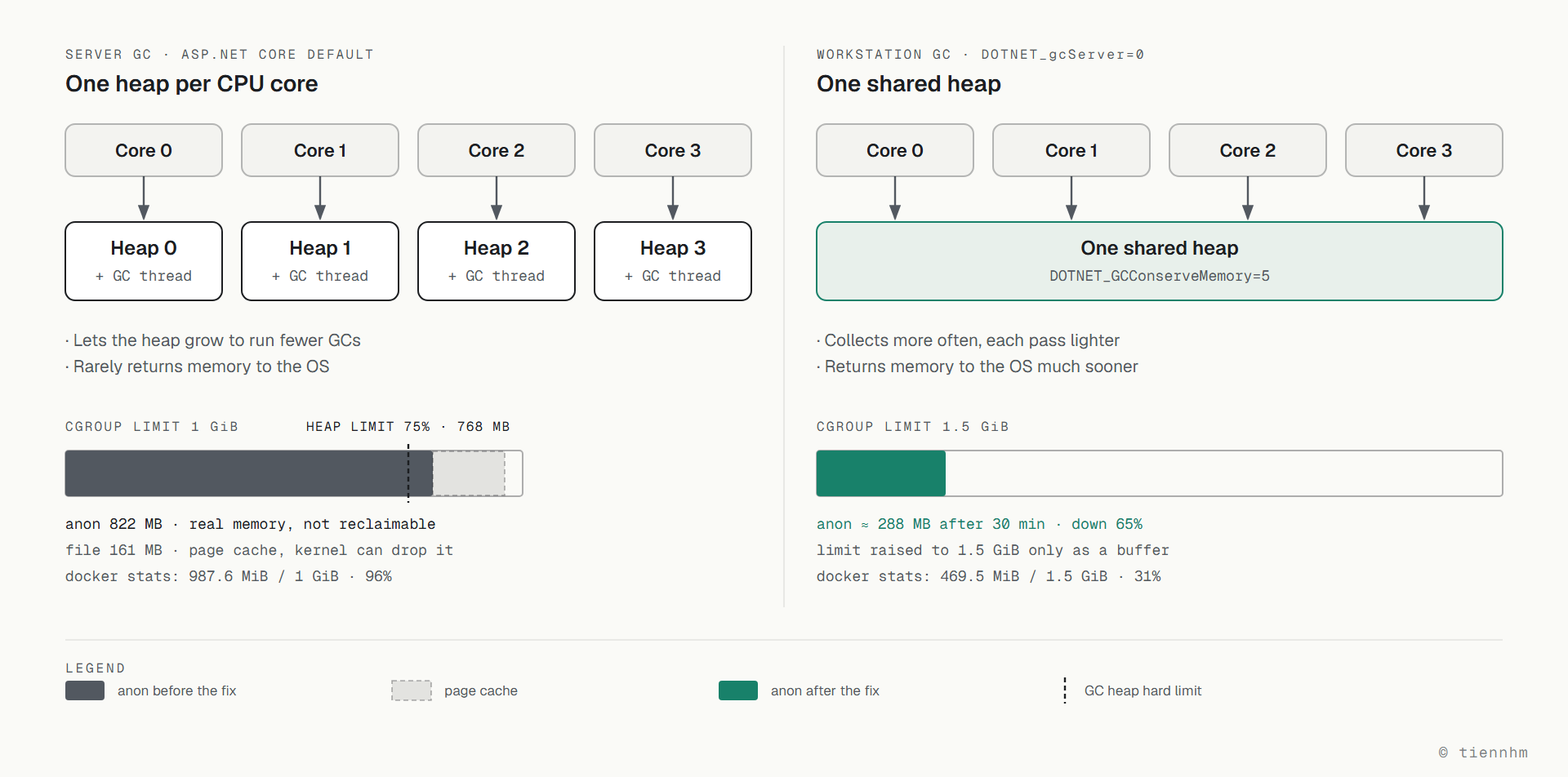
Server GC is designed for many-core servers under heavy load, and it optimises for throughput:
- Creates a separate heap per CPU core, each with its own GC thread
- Lets the heap grow larger in order to run GC less often
- Returns very little memory to the operating system — it holds on so the next allocation does not have to ask the kernel again
Workstation GC optimises for low latency and a small memory footprint:
- A single shared heap
- More frequent collections, each one lighter
- Returns memory to the operating system much sooner
For a low-traffic API inside a 1 GiB container, Server GC is pure waste: you are paying in RAM for throughput you never use.
Why the number settles around 800 MB
When it detects that it is running inside a container with a memory limit, .NET automatically sets the GC heap hard limit to 75% of the cgroup limit. With a 1 GiB ceiling, the heap is allowed roughly 768 MB.
Server GC happily grows to just under that line and then stays there. The 822 MB of anonymous memory — GC heap plus native memory, thread stacks, and JIT code — matches this behaviour exactly. The runtime is not misbehaving; it is doing precisely what it was designed to do.
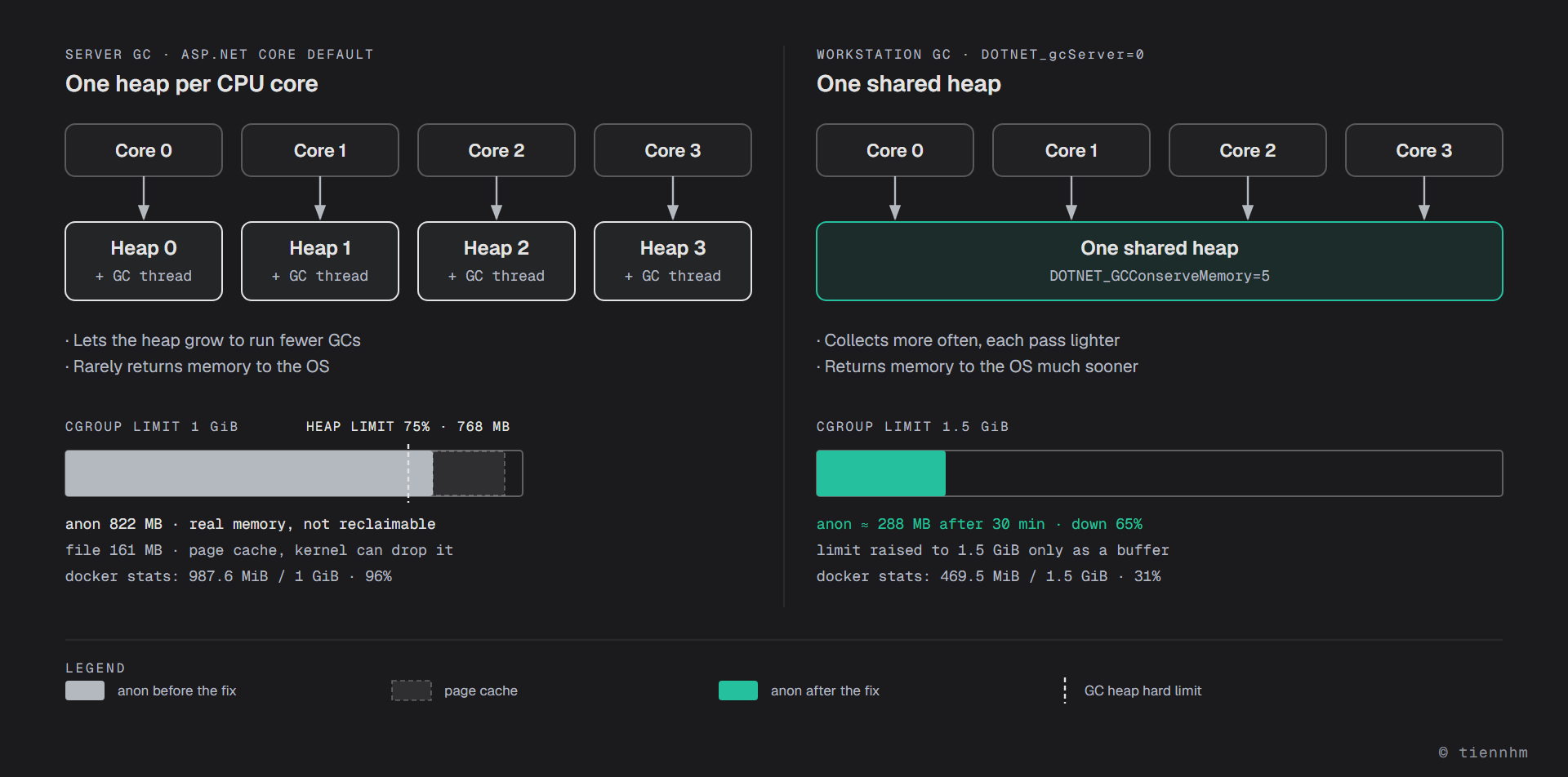
Here are the two modes side by side, on the same memory scale:
The fix
Steps to apply
- •Read anon from /sys/fs/cgroup/memory.stat for the real number — don't trust docker stats
- •Measure repeatedly over time — flat means retained heap, climbing means a leak
- •Check the container's env to see whether any GC configuration is already in place
- •Set DOTNET_gcServer=0 and DOTNET_GCConserveMemory=5
- •Raise the memory ceiling as headroom — in addition to the GC change, not instead of it
- Recreate the container and measure again at several points in time; don't conclude anything right after startup
In docker-compose.yml:
services:
  api:
    environment:
      - ASPNETCORE_URLS=http://+:80
      # Switch from Server GC to Workstation GC
      - DOTNET_gcServer=0
      # Scale of 0-9; higher means GC compacts and releases memory more aggressively
      - DOTNET_GCConserveMemory=5
    deploy:
      resources:
        limits:
          memory: 1.5G
Or declare it in the .csproj if you would rather bake it into the application itself:
<PropertyGroup>
  <ServerGarbageCollection>false</ServerGarbageCollection>
  <ConcurrentGarbageCollection>true</ConcurrentGarbageCollection>
</PropertyGroup>
The environment-variable route has one advantage: you can change it without rebuilding the image, which suits the job of hunting for the right setting on a real environment.
The measured result
Recreate the container and measure at several points, because the number right after startup always looks meaninglessly good:
| Point in time | docker stats | anon (real) | Notes |
|---|---|---|---|
| Before the fix | 987.6 MiB / 1 GiB — 96% | 822 MB | idle app, flat |
| Just started | 414.2 MiB / 1.5 GiB — 27% | — | proves nothing yet |
| After 10 minutes | 458.2 MiB — 30% | 285 MB | |
| After 20 minutes | 452.2 MiB — 29% | 274 MB | |
| After 30 minutes | 469.5 MiB — 31% | 288 MB | stable |
Anonymous memory fell from 822 MB to roughly 280 MB — a 65% reduction.
Just as important as the figure itself: the 285 → 274 → 288 MB sequence is oscillation around a stable level, not a climb. That confirms the original diagnosis — there was never a leak.
The container stayed healthy through all three measurements. Headroom for real traffic went from 36 MiB to over 1 GiB.
When you should NOT use Workstation GC
This section matters more than the results, and it is the part usually left out of "optimisation tips" posts.
Server GC exists because it genuinely is better in the situation it was built for. Do not apply this blindly:
- High-throughput services on many cores under sustained load — Server GC substantially reduces total pause time. Switching to Workstation here is shooting yourself in the foot.
- Containers given plenty of RAM and plenty of cores — if you have already provisioned 8 GB and 8 cores, Server GC is using exactly what you are paying for.
- Allocation-heavy workloads — APIs handling large payloads, image processing, batch jobs. The extra collections will show up in your latency numbers.
Workstation GC fits when: the container is small (1–2 GB), cores are few, traffic is low to moderate, and RAM is scarcer than CPU — which describes most internal APIs, admin panels, side projects, and anything running on a budget VPS.
The general rule: measure before the change, measure after it, and measure at several points in time. A single reading taken right after startup proves nothing.
Diagnostic commands worth memorising
# The real numbers: anon = unreclaimable, file = page cache
docker exec <container> sh -lc 'grep -E "^(anon|file) " /sys/fs/cgroup/memory.stat'

# Memory ceiling and current usage per cgroup v2
docker exec <container> sh -lc 'cat /sys/fs/cgroup/memory.max /sys/fs/cgroup/memory.current'

# Has the kernel ever killed it for running out of memory?
docker inspect <container> --format 'OOMKilled={{.State.OOMKilled}} Restarts={{.RestartCount}}'

# What GC configuration is the runtime actually running with?
docker exec <container> sh -lc 'env | grep -i "^DOTNET_"'

# Is the app genuinely idle?
docker logs --since 2h <container> 2>&1 | wc -l
Frequently asked questions
Will DOTNET_gcServer=0 slow my application down?
It can, but it depends on the load. Workstation GC collects more often with lighter pauses, so per-request latency tends to be steadier, while total throughput under heavy load on many cores is lower than with Server GC. For a low-traffic API in a small container the difference is barely measurable, whereas the RAM savings are immediate. For a high-load service, benchmark before you change anything.
How do I tell a memory leak from retained heap?
Measure repeatedly over time and look at the trend. A leak means memory CLIMBS over time and does not come back down even when the application is idle. Retained heap STAYS FLAT at some level. In this case three measurements five seconds apart gave the identical 987.6 MiB, and the app had not served a request in two hours — that is retained heap, not a leak. Only when you suspect a genuine leak do you need dotnet-counters, dotnet-dump and heap analysis.
What does GCConserveMemory=5 mean, and what value should I use?
It is a scale from 0 to 9 controlling how aggressively the GC compacts the heap and returns memory to the operating system. 0 is the default; 9 saves the most memory but costs the most CPU. A value of 5 is a reasonable balance to start from. Raise it gradually and measure — don't jump straight to 9.
Why does docker stats report 96% when anon is only 80%?
Because MemUsage in docker stats includes page cache — memory the kernel uses to buffer files. The kernel can reclaim that at any time when RAM gets tight, so it creates no real pressure and does not cause OOM kills. The number that decides the outcome is anon in /sys/fs/cgroup/memory.stat, the process's real memory that the kernel cannot reclaim.
Why does .NET stop around 768 MB in a 1 GiB container?
When it detects that it is running inside a container with a memory limit, .NET sets the GC heap hard limit to 75% of the cgroup limit. With a 1 GiB ceiling the heap may use roughly 768 MB. Add native memory, thread stacks and JIT code and you get the ~820 MB of anonymous memory observed here. To change that ratio, use DOTNET_GCHeapHardLimitPercent.
Is raising the memory ceiling a fix?
No, it is only headroom. Raise the ceiling while keeping Server GC and the GC heap hard limit rises with it at 75%, and the application will expand to fill the new space. In this case the ceiling was raised from 1G to 1.5G, but that was a supporting measure — what actually produced the 65% reduction was switching to Workstation GC.
Conclusion
Three things to take away from this case:
docker statsis not enough.MemUsageincludes page cache. The number to look at isanonin/sys/fs/cgroup/memory.stat.- High but flat RAM is not a leak. Measure repeatedly over time before you open a memory dump. The trend matters more than the absolute value.
- Framework defaults were chosen for a situation that may not be yours. ASP.NET Core defaults to Server GC because it targets many-core servers under heavy load. In a 1 GiB container on a budget VPS that default is waste — and the fix is two environment variables.
The specific case here: 822 MB down to 280 MB, a 65% reduction, without changing a single line of code.
Last updated: September 2026