Four Indexes Made INSERT 6× Slower: The Bill Nobody Mentions

Indexes speed up reads by charging you on every write, and the charge is larger than most people picture. Measured on PostgreSQL 16 with the same 200,000 rows: a table with no indexes finished inserting in 287.8 ms and occupied 10.2 MB; a table with four indexes took 1,722.3 ms and occupied 27 MB. That is 6× slower and 2.6× bigger — just to carry four structures that no query may ever touch. The right question is not "should this column have an index?" but "does the read time saved cover the write time paid?"
Every post about database optimization ends with advice to add an index. Very few mention the bill that comes with it, and fewer still put a number on it.
This post goes deeper into two lessons from the 30-day SQL series: Database design and Index. Every figure below was measured on PostgreSQL 16.11.
TL;DR
- Four indexes took the same
INSERTof 200,000 rows from 287.8 ms → 1,722.3 ms (6× slower). - Table size went from 10.2 MB → 27 MB (2.6× bigger).
- A composite index on
(a, b)does not serveWHERE b = ?— the leftmost prefix rule. - An index on
(a)when(a, b)already exists is pure write cost. Drop it. - Low-selectivity columns (a handful of repeated values) are rarely worth indexing.
- Use
pg_stat_user_indexesto find indexes that have never been used.
The bill
Two identical tables, differing only in how many indexes they carry:
CREATE TABLE w0(id int, a int, b int, c int, d int);
CREATE TABLE w4(id int, a int, b int, c int, d int);
CREATE INDEX ON w4(a); CREATE INDEX ON w4(b);
CREATE INDEX ON w4(c); CREATE INDEX ON w4(d);
Inserting the same 200,000 rows into each:
INSERT time | Size | |
|---|---|---|
| No indexes | 287.8 ms | 10.2 MB |
| 4 indexes | 1,722.3 ms | 27 MB |
| Difference | 6.0× slower | 2.6× bigger |
The reason is plain enough: every INSERT does not merely write one row into the table. It must also insert an entry into each B-tree, keep every one of those trees balanced, and write each of those changes to the write-ahead log. Four indexes means five structures change instead of one.
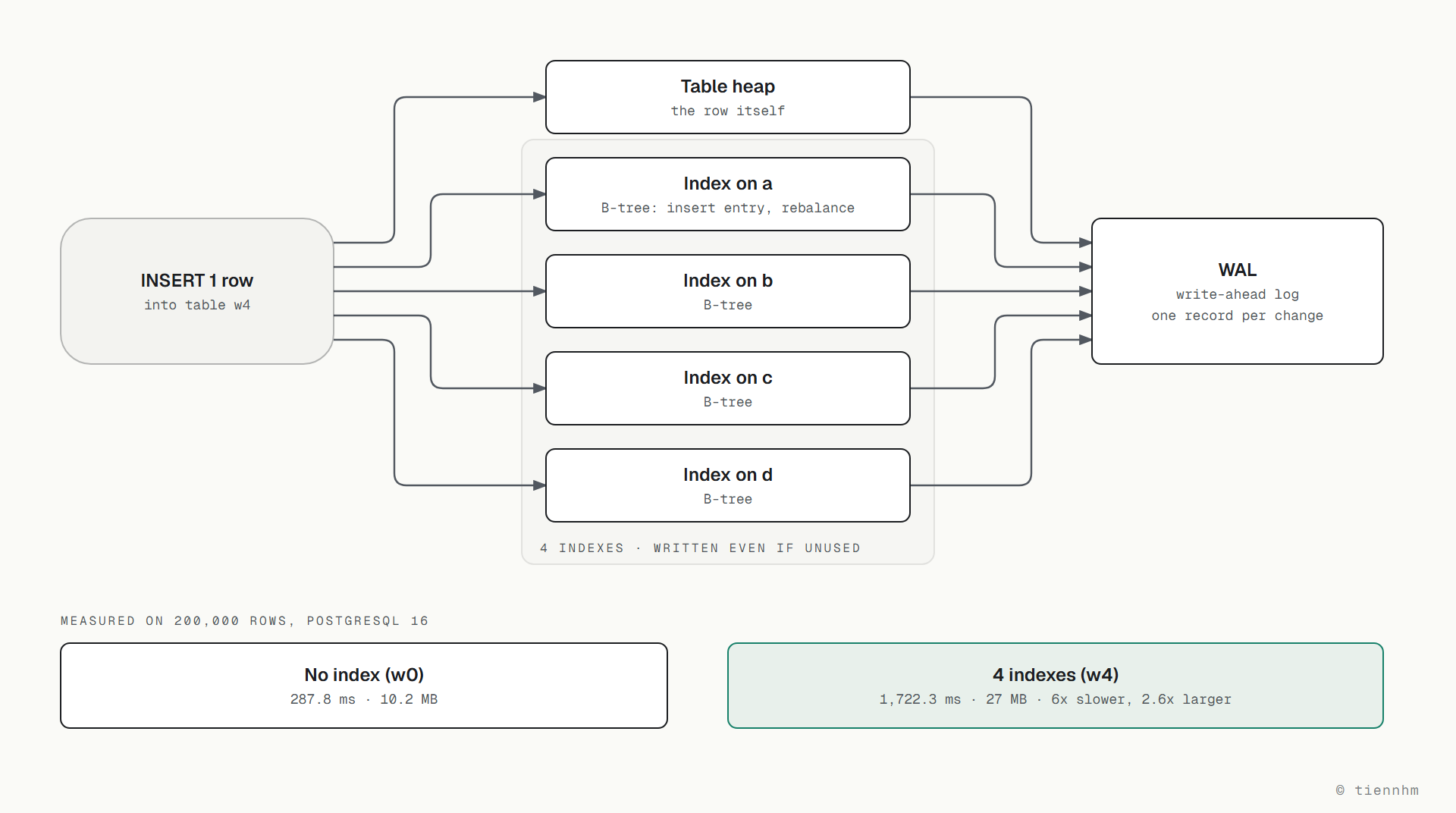
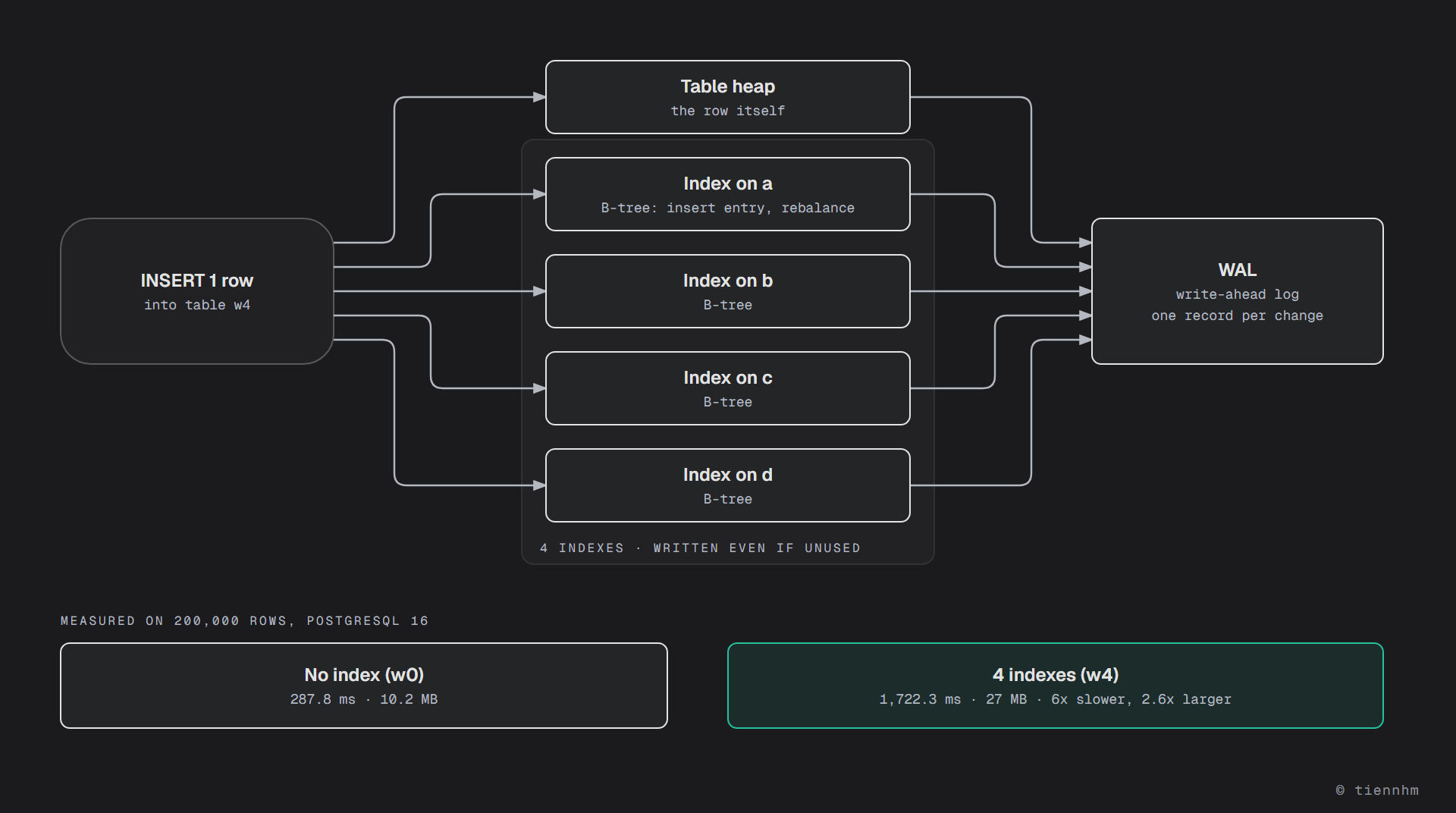
Here is the part worth sitting with: you pay that cost even when no query ever uses those four indexes. An unused index is still updated in full on every write.
UPDATE is worse than INSERT in one specific way. If you modify an indexed column, the database must delete the old entry and insert a new one in the tree. Modifying an unindexed column is far cheaper — which is why indexing a frequently updated column (status, last-modified timestamp) costs more than indexing a static one.
Leftmost prefix: column order is a design decision
This is the rule that decides how many indexes you need, so it feeds straight back into the bill above.
A composite index is sorted by its leftmost column first, then by the next — like a phone book sorted by surname and then by first name. With CREATE INDEX ON t(a, b):
| Query | Can it use the index? |
|---|---|
WHERE a = 1 | ✅ |
WHERE a = 1 AND b = 2 | ✅ |
WHERE b = 2 | ❌ |
WHERE a = 1 ORDER BY b | ✅ (sorting too) |
The third row is the one that surprises people. A phone book sorted by surname is no help when all you know is the first name — you still have to read the whole thing.
The practical consequence: one index on (a, b) in the right order replaces two separate indexes, while the wrong order forces you to create a second index and pay the write cost twice. How to pick the order:
- Columns used in equality conditions (
=) go first. - Columns used for ranges (
>,<,BETWEEN) go after, because once a range condition is applied, columns further right can no longer narrow anything down. - Columns used for
ORDER BYgo last.
Three kinds of index worth dropping
1. Redundant indexes
If (a, b) already exists, then (a) is entirely redundant — every query that could use (a) can use (a, b) under the leftmost prefix rule. Keeping it only buys you extra write cost and extra disk.
Finding them in PostgreSQL:
SELECT indrelid::regclass AS bang, array_agg(indexrelid::regclass) AS index_trung
FROM pg_index
GROUP BY indrelid, (indkey::int2[])[0:1]
HAVING count(*) > 1;
2. Indexes that have never been used
PostgreSQL already counts how many times each index has been scanned:
SELECT relname AS bang, indexrelname AS index, idx_scan AS so_lan_dung,
       pg_size_pretty(pg_relation_size(indexrelid)) AS dung_luong
FROM pg_stat_user_indexes
WHERE idx_scan = 0
ORDER BY pg_relation_size(indexrelid) DESC;
An idx_scan = 0 after a few weeks in production is fairly solid evidence. Two caveats before you drop anything: the counter resets on restart or when pg_stat_reset() is called, and an index backing a UNIQUE constraint or a primary key cannot be dropped even at idx_scan = 0 — it exists for correctness, not for read speed.
3. Indexes on low-selectivity columns
A gender column has two values; a status column has four. Indexing them is close to pointless: each value matches a large share of the table, so the database usually concludes that a sequential scan is cheaper than walking the index and jumping back to the heap.
One exception worth knowing: heavily skewed distributions. If 99.9% of orders sit in state completed and 0.1% in state failed, a partial index covering only the rare case is very effective:
CREATE INDEX idx_don_loi ON don_hang(tao_luc) WHERE trang_thai = 'loi';
That index is small, cheap to maintain, and serves exactly the query you actually run often.
When the write cost is worth paying
There is no magic number, but a few questions get you to a decision quickly.
What is this table's read-to-write ratio? A product catalogue is read thousands of times and written a few times a day — index it freely. An event log is written constantly and read rarely — every index there is a heavy tax.
How often does the query that needs it actually run? A report that runs once a month does not justify an index that must be updated on every write for thirty days. Accepting a two-minute report is usually the right call.
Can an existing index already serve it? Before adding a new one, check whether a composite index you already have covers the query under the leftmost prefix rule. Extending an existing index is usually cheaper than creating another.
Does this column get UPDATEd often? An index on a volatile column costs several times more than one on a static column, because every modification is a delete plus a re-insert in the tree.
Review your indexes before adding another
- •Check the table's read/write ratio — on write-heavy tables every index is a heavy tax
- •Check whether an existing index already covers the query under leftmost prefix
- •Drop redundant indexes: (a) when (a, b) already exists
- •Use pg_stat_user_indexes to find indexes with idx_scan = 0
- •For heavily skewed columns, consider a partial index instead of a full one
- Measure write time after adding an index, not just read time
Keep reading
This post expands on two points from the 30-day SQL series:
| Lesson in the series | How it connects |
|---|---|
| Database design | Balancing reads against writes when designing a schema |
| Index | B-tree structure and index creation syntax |
| SQL query optimization | Rewrite the query before reaching for a new index |
| Query performance | Reading an execution plan to see whether an index is used |
| Transactions and ACID | Indexes make write transactions longer and hold locks for longer |
The other half of the story — an index that exists but never gets used — is in the post on sargability. The two are two halves of the same question: which indexes are you paying write cost for, and which of those actually serve your queries.
Frequently asked questions
How much do indexes slow down writes?
Measured on PostgreSQL 16 with the same 200,000 rows, a table with no indexes finished inserting in 287.8 ms while a table with four indexes took 1,722.3 ms — roughly 6 times slower. Size grew from 10.2 MB to 27 MB as well. The reason is that every INSERT must add an entry to each B-tree, keep those trees balanced, and write each of those changes to the write-ahead log. You pay that cost even when no query ever uses those indexes.
Does a composite index on (a, b) serve a query filtering on b?
No. A composite index is sorted by its leftmost column first, like a phone book sorted by surname and then first name, so it serves WHERE a = ? and WHERE a = ? AND b = ? but not WHERE b = ? on its own. This is the leftmost prefix rule. The consequence is that column order in a composite index is a design decision: the right order lets one index replace two, the wrong order forces a second index and a second write cost.
How do I find indexes that are never used?
In PostgreSQL, query pg_stat_user_indexes and filter for rows where idx_scan is 0, joining pg_relation_size to see how much disk they occupy. After a few weeks in production that is fairly solid evidence. Two caveats before dropping anything: the counter resets on restart or when pg_stat_reset is called, and an index backing a UNIQUE constraint or primary key cannot be dropped even at idx_scan = 0, because it exists for correctness rather than read speed.
Should I index a status or gender column?
Usually not, because selectivity is low: each value matches a large share of the table, so the database generally concludes that a sequential scan is cheaper than walking the index and jumping back to the heap. The exception worth knowing is a heavily skewed distribution — say 99.9% of orders completed and 0.1% failed. In that case a partial index covering only the rare value is small, cheap to maintain, and serves exactly the query you run often.
Is UPDATE more expensive than INSERT on a heavily indexed table?
Yes, in one important way. If you modify an indexed column, the database must delete the old entry and insert a new one in the tree — two operations instead of one. Modifying an unindexed column is far cheaper. This is why indexing a frequently updated column such as status or last-modified timestamp costs considerably more than indexing a column that barely changes.
When is an index's write cost worth paying?
Weigh four questions. What is the table's read-to-write ratio, since a catalogue read often and written rarely can carry indexes freely while a log table pays a heavy tax per index. How often the query that needs it actually runs, since a monthly report does not justify updating an index on every write for thirty days. Whether an existing index already covers it under leftmost prefix. And whether that column is updated frequently.
Conclusion
An index is not something free that you sprinkle over a table to be safe. It is a trade-off with an itemised bill, and in the measurement above that bill reads 6× slower writes plus 2.6× the disk.
Three things worth remembering:
- Measure the writes, not just the reads. Adding an index and watching a query get faster is half the picture; the other half sits in
INSERTandUPDATEtimings that nobody opens. - Column order in a composite index decides how many indexes you need. Get it right and one replaces two; get it wrong and you pay twice.
- An unused index still charges full price.
idx_scan = 0is one of the fastest-paying queries you can run against a live database.
Last updated: September 2026
Related posts
- 27. Database design best practices — Normalization principles, when to denormalize, and best practices for designing an effective schema.
- 28. SQL query optimization — Optimizing SQL queries, analyzing them with EXPLAIN ANALYZE, avoiding common mistakes, and using indexes, partitions and caching.
- 15. Index — An introduction to indexes in SQL, how to create and use them, and how to optimize queries with them.